
Google Maps is often the first trust checkpoint for local healthcare decisions.
If your clinic is not visible there, patients are more likely to choose the businesses that appear above you.
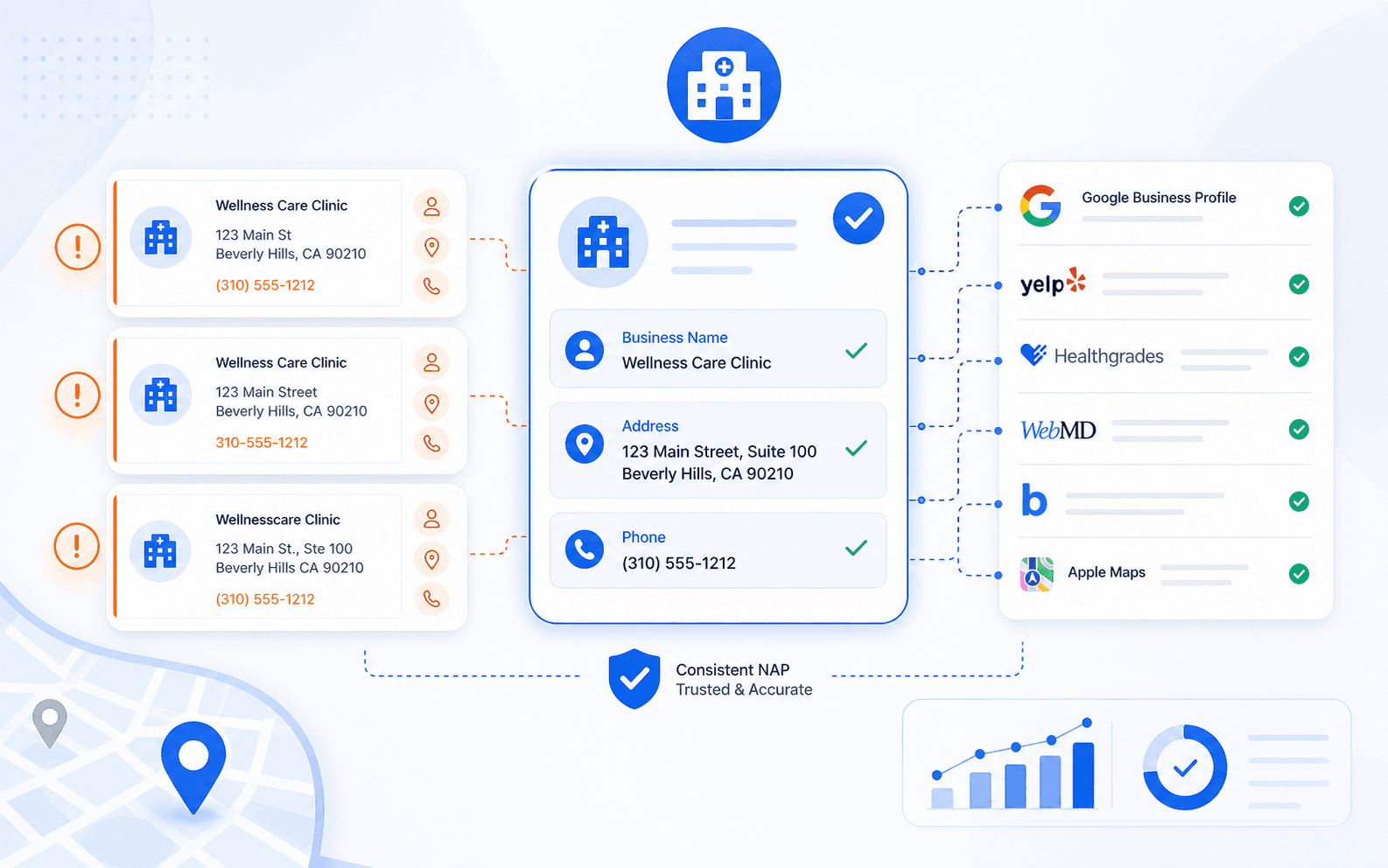
Not every NAP variation hurts clinic SEO the same way. Some differences are harmless formatting noise. Others create enough identity confusion to weaken local trust, duplicate listings, or slow down visibility improvements after a move, rebrand, or phone-number change.
That distinction matters because clinics often overreact to tiny formatting differences while ignoring the variations that actually cause damage.
Guide overview
What you'll work through in this guide
What NAP means in clinic SEO
NAP stands for:
NAP variations that usually do not hurt much
These are usually minor if the underlying business identity is still clearly the same:
NAP variations that can hurt clinic SEO
This is one of the most common serious issues.
The short version is this: harmless differences usually stay cosmetic, but conflicting location, phone, or business-name variations can absolutely create local SEO problems.
If you already suspect the footprint is messy, start with the clinic NAP variations guide. It is the fastest path to deciding whether you need cleanup, standardization, or a broader listings rebuild.
What NAP means in clinic SEO
NAP stands for:
- Name
- Address
- Phone
For clinics, it often extends into related identity fields too:
- website URL
- suite format
- provider or location naming
- hours
- category language in some directories
Google does not require every listing to look character-for-character identical. But it does work better when the broader local identity picture is stable.
In recurring clinic audits, the biggest problem is usually not punctuation. It is conflicting records that make the clinic look like more than one business.
NAP variations that usually do not hurt much
These are usually minor if the underlying business identity is still clearly the same:
- `Suite 200` vs `Ste 200`
- `Road` vs `Rd`
- `Street` vs `St`
- a phone number with or without parentheses
- light punctuation differences in the business name
These small variations rarely cause the biggest local SEO problems on their own.
That said, if they appear alongside bigger inconsistencies, they can add noise to an already weak footprint.
NAP variations that can hurt clinic SEO
1. Different business names across listings
This is one of the most common serious issues.
Examples:
- brand name on one listing, legal name on another
- clinic name on one profile, provider name on another
- old branded variation still live after a rebrand
When the naming layer drifts too far, directories and search systems can treat the clinic as separate entities.
2. Conflicting phone numbers
This matters more than many clinics expect.
Problems usually show up when:
- an old tracking number still appears widely
- one directory uses a front desk number and another uses a call-center number
- a vendor swapped the main number without cleaning the old footprint
If multiple phone identities stay active long enough, the listings graph becomes harder to trust.
3. Address differences that imply a different location
These are much more serious than normal abbreviations:
- missing or wrong suite number
- old address still live after a move
- partial address mismatch across platforms
- one profile using a hidden-address setup while others still show the old location
This is one of the biggest local SEO pain points for clinics that move offices or adjust office layouts.
4. URL mismatches
This is often overlooked.
Examples:
- home page on one profile, old location page on another
- outdated domain still active in old listings
- HTTPS and non-HTTPS mismatches combined with old redirects
URL drift can weaken both user trust and local data consistency.
5. Duplicate practitioner and clinic identities
Multi-provider clinics often run into this problem when:
- one listing was created for the clinic
- another was created for a provider
- a third was created by a directory or vendor pull
This does not always start as a classic NAP issue, but it often becomes one quickly.
What to check first
1Step 1: Confirm the official source record+
Lock the exact version of:
- clinic name
- address
- suite format
- phone
- website
If your source record is still changing, cleanup will keep drifting.
2Step 2: Search for old numbers and old addresses+
Do this before you worry about tiny formatting differences.
In real clinic SEO work, this is where the bigger problems usually show up.
3Step 3: Check whether one variation is spreading from a vendor or data source+
Sometimes one bad record keeps repopulating old information into multiple directories.
4Step 4: Review the highest-trust listings first+
Fix the most visible and authoritative profiles before working through lower-priority directories.
If the footprint is broad and inconsistent, medical citation building usually becomes more efficient than manual one-off fixes.
How Curex usually handles NAP cleanup
1. Separate harmless formatting from harmful conflict
Not every mismatch deserves the same urgency.
2. Identify the source of bad data
This could be:
- an old vendor
- a moved location
- a call tracking experiment
- practitioner-created profiles
- outdated directory syndication
3. Prioritize the listings that shape trust first
That usually means:
- Google Business Profile
- core business directories
- healthcare and provider directories
- strong local authority directories
4. Decide whether cleanup, rebuilding, or vendor replacement is needed
If the footprint keeps reintroducing the same old data, medical listings and local SEO services or a Yext replacement service style cleanup path may be the smarter next step.
Common mistakes to avoid
Mistake 1: obsessing over tiny abbreviation differences
This burns time that should go toward old phone numbers, duplicate listings, or moved-address problems.
Mistake 2: ignoring provider-created listing variations
These often create the most confusing local identity problems for clinics.
Mistake 3: updating only the website and assuming directories will catch up
They usually do not.
Mistake 4: keeping multiple active phone identities
This is one of the fastest ways to make the footprint look unstable.
Mistake 5: fixing one listing at a time without a full map of the footprint
That often leads to partial cleanup and recurring regressions.
Final takeaway
The NAP variations that hurt clinic SEO are not usually the tiny cosmetic ones.
The real problems come from:
If the clinic wants cleaner local trust, the goal is not perfect punctuation. It is one stable business identity across the listings footprint.
Ask these first
- conflicting business names
- old or inconsistent phone numbers
- wrong or outdated addresses
- URL drift
- duplicate clinic or provider identities
Methodology for Which NAP Variations Hurt Clinic SEO?
Last reviewed May 6, 2026This article is grounded in reviewed guidance, local SEO workflows, and the source material linked below.
Frequently Asked Questions About Which NAP Variations Hurt Clinic SEO?
Usually not by itself. Small formatting differences like Suite vs Ste are normally harmless unless they appear alongside more serious inconsistencies such as old addresses or wrong phone numbers.
The biggest problems usually come from conflicting business names, old phone numbers, wrong addresses, outdated URLs, and duplicate clinic or provider identities.
Google Business Profile should be correct early, but clinics usually get better results when they also clean the broader high-trust directory footprint instead of treating GBP as the only source of truth.

Next step for GBP visibility
Turn this clinic visibility diagnosis into a concrete next move
Use one clear workflow to confirm the issue, improve your Google Business Profile, or get help when the problem involves reinstatement, listings cleanup, or ongoing GBP management.
- Fast visibility scan for clinic locations
- GBP workflows built for local healthcare teams
- Support for rankings, listings, and reinstatement paths
Continue learning
Related Resources for Which NAP Variations Hurt Clinic SEO?
Use these supporting resources to go deeper into the topic cluster without losing the thread of what you just learned.
Related Curex resources
Practical resources to keep moving
Foundational guides, tools, and service paths that support the next stage of implementation.
More from this topic
Continue exploring this cluster
Supporting reads that deepen the same topic without competing with the main CTA above.